Knowledge + Memory
Give your workforce approved documents, business guidance and conversation context.
Turn customer inquiries into coordinated work across sales, operations and support. Choose prebuilt AI departments, connect your tools and keep your team in control.
 WhatsApp
 Instagram
 Messenger
 Telegram
 LinkedIn
 TikTok
 Threads
 Pinterest
 X
XThese channels refer only to messaging, chat and conversation automation—not every feature of each platform. Availability depends on your plan, provider APIs, permissions and configuration.
Built for the channels where businesses worldwide sell, support and reconnect with customers. Connect the channels your operation needs within one governed workforce.

Manage customer conversations, coordinate departments and connect the next action from one workspace.
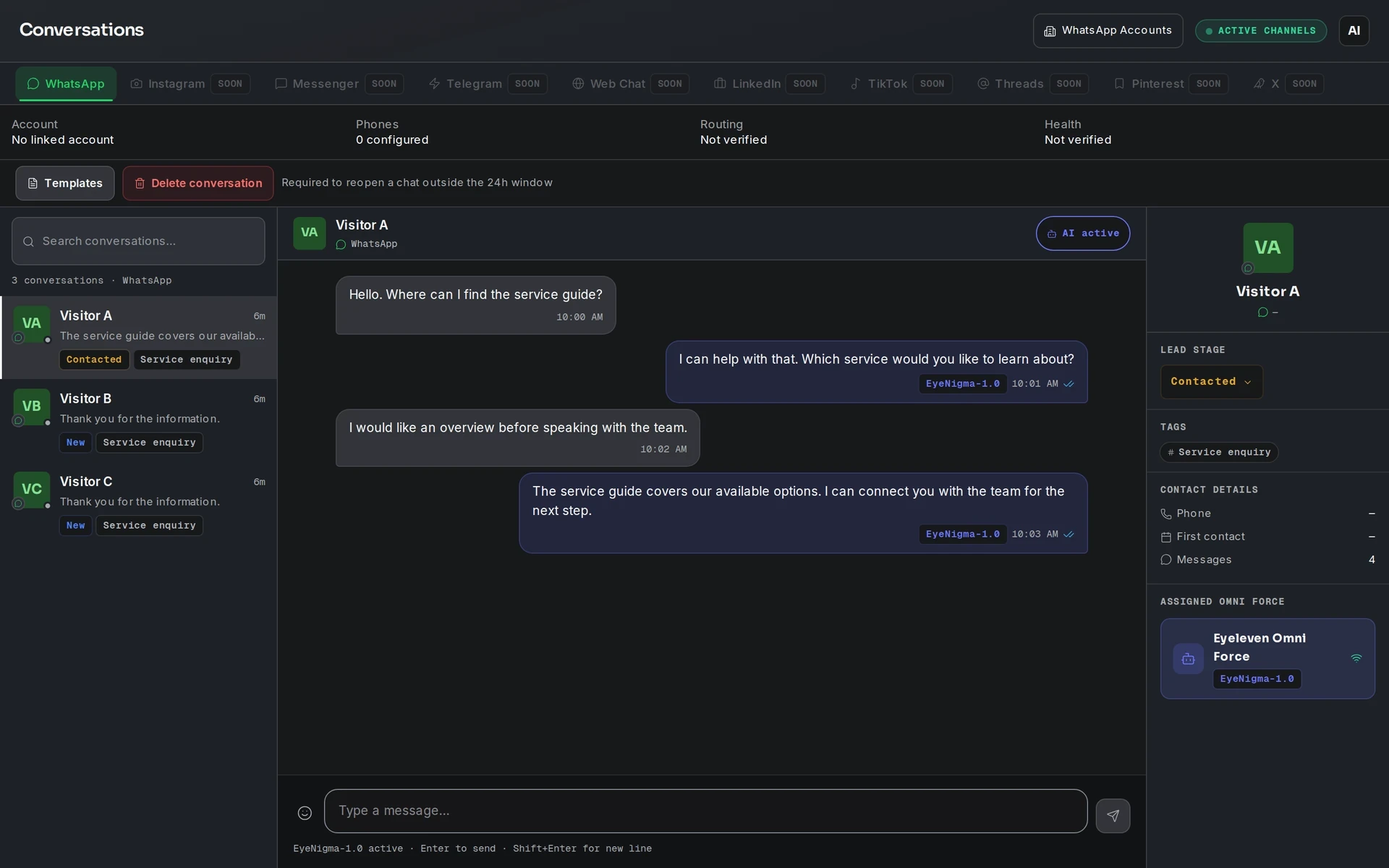
Conversations, OmniForces and Flows show actual interfaces with demonstration data. Voice shows a capability overview.
Give your workforce approved documents, business guidance and conversation context.
Review activity, usage and outcomes. Reporting history follows your plan.
Discover reusable modules for your operation. Access and availability follow your plan.
EYELEVEN OMNIFORCES
Prebuilt AI Forces for the functions that keep your business moving—from sales and support to operations, finance and strategy.
Defined roles. Your business context. Human control.
Resolve customer requests, guide onboarding and coordinate service recovery.
Qualify leads, prepare approved quotations and move opportunities toward a verified close.
Plan campaigns, create brand-aligned content and measure acquisition performance.
Eight more foundations for operations, finance, people, product and services, technology, supply, legal and strategy.
See incoming questions, bookings and exceptions organized for the right owner.
Departments working together
Sales captures the requirement. Operations prepares delivery. Finance and Support carry the work forward with the same agreed context.
Set the permitted actions and name the person responsible for exceptions. A request stays pending until its outcome is confirmed.
Business context & human controlIllustrative customer journey
Customer need, approved quote version and recorded acceptance.
Agreed scope, dates, prerequisites and remaining dependencies.
Verified billable scope, buyer details and approved terms.
Purchased scope, agreed milestones and relevant customer context.
Authorized aggregate delivery, financial and service results.
Example only. Available actions depend on connected tools, permissions and workspace setup.
Every OmniForce uses the same framework to move from an incoming signal through business context, permitted decisions and verified outcomes.

Recognize an incoming request or event and establish what needs attention.
Select a number to exploreEyeNigma uses the configured model gateway. Your OmniForces carry the business context and responsibilities.
Hover or select a model family to explore
Three paths. One configured gateway.
Illustrative provider landscape. The actual model route depends on gateway and workspace configuration.
Explore 24 illustrative connections. Availability follows your plan, provider setup and permissions.
Example: organize an incoming customer inquiry on the primary launch channel.
Start with a focused OmniForce. Add capacity and capabilities as your operation grows.
Launch pricing. These prices may increase soon. Your subscription price and terms are confirmed before payment.
Start focused. A first OmniForce for a clear workflow.
Public $249/month · Partner $199/month
Eligible referral code required for partner offer
Build momentum. Connect more of your operation.
Public $649/month · Partner $549/month
Eligible referral code required for partner offer
Scale your operation. Coordinate your AI workforce.
Public $1,349/month · Partner $1,099/month
Partner-only access required for partner offer
Create your workspace, then choose your plan during setup.
For agencies, multi-brand businesses, and enterprise operations that need a tailored deployment and commercial agreement.
Unlimited OmniForces, channels and seats; 1M+ monthly credits, per agreement. White-label, API/webhooks, custom integrations, priority Neural Store access and a named account manager.
Explore the details behind each plan. Monthly billing; terms confirmed before checkout.
| Built for your next stage. | Start focusedAscent$249/month | Connected workflowsNexus$649/month | Scale operationsHyperion$1,349/month | Tailored deploymentOmnisCustomagreed terms |
|---|---|---|---|---|
| Capacity & investment | ||||
| Public / partner price per month | $249 / $199 with eligible code | $649 / $549 with eligible code | $1,349 / $1,099 partner-only | Custom quote · agreed terms |
| Included / maximum OmniForces | 1 / 2 | 3 / 6 | 7 / 11 | Unlimited, per agreement |
| Extra active OmniForce / month | $99 each | $99 each | $149 each | Agreed terms |
| Monthly credits | 30,000 | 100,000 | 350,000 | 1M+, per agreement |
| Channels / seats | 1 / 3 | 3 / 10 | 6 / 40 | Unlimited, per agreement |
| Platform capabilities | ||||
| Knowledge documents | 10 | 100 | Unlimited | Unlimited |
| Workflows | Templates | Full Studio + Copilot | Full Studio + Copilot | Full Studio + Copilot |
| Voice / API / white-label | No / No / No | Yes / No / No | Yes / Yes / No | Yes / Yes / Yes |
| Analytics retention | 30 days | 90 days | 1 year | Agreed terms |
| Launch & service | ||||
| Assurance | 7-day free trial | 7-day money-back guarantee | 7-day money-back guarantee | Agreed terms |
| Onboarding | Self-serve guided setup | Assisted launch | Managed rollout | Bespoke program |
| Support / first response target | Email / 1 business day | Priority email + chat / 4 business hours | Dedicated channel / 1 business hour | Account manager / agreement |
| Availability | Standard | Standard | 99.9% target | Contracted SLA |
Monthly subscriptions renew monthly; yearly subscriptions renew yearly. Prices are in USD; taxes, applicable withholding and Meta messaging fees are separate.
Credits are shared across OmniForces and refresh monthly without rollover. When Wallet-funded usage is enabled and separately purchased Wallet balance is available, it can fund work beyond the included pool, or you can wait for reset.
Upgrades are immediate and prorated; downgrades start next period. Cancellation retains paid-period access.
No setup fees. Guided onboarding is included; its delivery model follows your plan.
USD, billed monthly. Taxes and applicable withholding excluded. Partner offers require eligible referral or access. Meta messaging fees are separate. Availability and support responses are service targets unless committed in an enterprise agreement.
The operating model, practical setup, and terms that matter.
Explore documentationStart with one department and one clear workflow.
Time zone from your browser settings · no location request.
Illustrative countdown to a local handoff at 08:00 or 18:00. No workflow is scheduled.


